
Need a place to capture an idea, polish your writing, create content, or edit a snippet of code? You have more choices than ever. A Notepad++ download gives you a powerful desktop editor with features built for programmers and advanced text work. An online notepad, on the other hand, opens directly in your browser and focuses on speed, convenience, and simple writing.
So, which one should you use?
The answer depends on what you're trying to accomplish. If you regularly edit source code, work with large text files, or want advanced editing features, Notepad++ is a strong desktop option. If you simply need to write something quickly without installing software, an online text editor may be the better fit.
This guide compares both options across features, accessibility, privacy, performance, coding, writing, productivity, and everyday use. By the end, you'll have a clearer idea of which tool belongs in your workflow—and when using both makes the most sense.
Notepad++ vs Online Notepad–Side by side comparison
Notepad++ Download vs Online Notepad at a Glance
The simplest distinction is this: Notepad++ is installed desktop software, while an online notepad runs in your web browser.
Notepad++ is designed as a feature-rich text and source-code editor for Windows. It offers capabilities such as syntax highlighting, search and replace, tabs, plugins, and other tools that go well beyond basic text editing. It is especially useful when you spend a lot of time working with code or large text documents.
An online notepad takes the opposite approach. You open a browser, visit the tool, and start typing. There is usually little or no setup, which makes it useful for quick notes, temporary text, brainstorming, copying and cleaning text, drafting messages, or working from a device where you don't want to install software.
| Feature | Notepad++ | Online Notepad |
|---|---|---|
| Installation | Required | Usually none |
| Works in browser | No | Yes |
| Advanced code editing | Excellent | Basic to moderate |
| Quick notes | Good | Excellent |
| Syntax highlighting | Yes | Usually limited |
| Plugins | Yes | Usually no |
| Device flexibility | Limited to installed devices | High |
| Setup time | Longer | Very low |
| Offline use | Yes | Depends on the tool |
| Best for | Developers and advanced text editing | Notes, drafts, and quick text |
Neither option automatically wins. The right choice depends on whether you value advanced control or immediate accessibility.
What Is Notepad++?
Notepad++ is a free, open-source text and source-code editor for Windows. It was created as a more capable alternative to basic text editors, and it has become a familiar tool among developers, technical users, writers, and anyone who regularly works with plain text.
When people search for a notepad++ download, they're generally looking for the official desktop application they can install on a Windows computer.
The program supports many programming and markup languages and includes features that make handling structured text much easier. Depending on your workflow, you can use it to edit HTML, CSS, JavaScript, XML, configuration files, scripts, logs, and ordinary text documents.
The major advantage is control. Once installed, you have a dedicated editor on your computer rather than relying on a browser tab.
What Makes Notepad++ Popular?
One reason Notepad++ has remained useful is that it sits between a basic notepad and a full development environment.
It provides features such as:
- Multiple document tabs
- Find and replace
- Regular expression search
- Syntax highlighting
- Code folding
- Line numbering
- Plugins
- Macro recording
- Multiple editing tools
- Large-file handling capabilities
Imagine you're working with a 2,000-line configuration file and need to replace one value across dozens of locations. A basic text editor can become frustrating quickly. Notepad++ gives you tools that make that kind of work considerably easier.
It also works well when you want a dedicated workspace that doesn't depend on an internet connection.
Who Should Use Notepad++?
Notepad++ is a particularly good fit for:
- Developers
- Web designers
- System administrators
- Technical writers
- IT professionals
- Students learning programming
- People editing structured text
- Users who need advanced search and replace
For example, suppose you're learning HTML and want to inspect a webpage's source. You can open the file in Notepad++, view the code with syntax highlighting, make changes, and save it locally.
That's a very different workflow from opening an online notepad to jot down a few ideas.
What Is an Online Notepad?
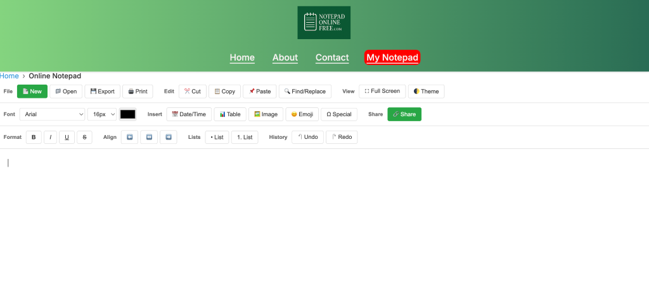
Online notepad showing a simple task list and ideas
An online notepad is a browser-based tool that lets you create and edit text without installing traditional desktop software.
The concept is intentionally simple. Open your browser, access the notepad, type your content, and use the available editing features.
This makes an online notepad useful for situations where speed matters more than advanced functionality.
Need to copy some text temporarily? Write a shopping list? Draft an email? Save a few ideas while researching something? A browser-based notepad can handle those jobs without requiring you to install a program.
For a lightweight experience, you can use Notepad Online Free to open a browser-based writing space and start working immediately.
How an Online Text Editor Works
An online text editor typically loads inside your browser and provides a text area where you can enter or edit content.
Depending on the specific service, it may offer features such as:
- Plain-text editing
- Basic formatting
- Copy and paste
- Text cleanup
- Word or character counts
- Easy access from different devices
- Browser-based workflows
The biggest benefit is the low barrier to entry.
You don't have to search for an installer, wait for software updates, or configure a desktop application just to write a few paragraphs.
For example, imagine you're using a public computer and need somewhere to draft a message. Installing Notepad++ isn't practical. Opening an online notepad is much faster.
Who Should Use an Online Notepad?
An online notepad is useful for:
- Students
- Writers
- Bloggers
- Freelancers
- Remote workers
- Researchers
- Casual users
- People who need temporary notes
- Anyone working across multiple devices
It is especially useful for short, disposable, or fast-moving content.
If you're brainstorming ten article titles, drafting a grocery list, preparing questions for a meeting, or temporarily cleaning up copied text, you probably don't need a heavyweight editor.
Notepad++ vs Online Notepad: Key Differences
The biggest difference isn't simply "desktop versus browser." It's the philosophy behind each tool.
Notepad++ prioritizes depth. An online notepad prioritizes accessibility.
Here's how they compare across common use cases.
| Use Case | Better Choice | Why |
|---|---|---|
| Writing a quick note | Online notepad | Fast and convenient |
| Editing source code | Notepad++ | Advanced coding features |
| Working offline | Notepad++ | Desktop application |
| Temporary text | Online notepad | No installation required |
| Advanced search | Notepad++ | Powerful search tools |
| Brainstorming | Online notepad | Minimal setup |
| Large coding projects | Notepad++ | Better editing environment |
| Using a public computer | Online notepad | Browser access |
| Simple writing | Online notepad | Less complexity |
| Plugin-based workflow | Notepad++ | Extensible through plugins |
Consider your actual habits rather than choosing based on the longest feature list.
A tool can have 100 features and still be the wrong choice if you only need three.
Notepad++ Download: Pros and Cons
Advantages of Notepad++
A Notepad++ download gives you a dedicated application with advanced editing capabilities.
The biggest benefits include:
Advanced text editing: Find and replace, regular expressions, tabs, and other tools make complex editing easier.
Coding support: Syntax highlighting and code-oriented features are valuable for developers and technical users.
Offline access: You can work without depending on a live internet connection.
Customization: Plugins and configuration options let experienced users adapt the environment to their needs.
Local workflow: Files can remain on your computer instead of being entered into a browser-based service.
Disadvantages of Notepad++
There are tradeoffs.
You have to download and install the software. Updates and maintenance are part of the desktop workflow. It is also primarily designed for Windows, so users on other operating systems may need alternatives or compatibility solutions.
It can also be overkill.
If you're trying to write a 100-word note, opening an advanced editor may feel like bringing a toolbox to open a single envelope.
Online Notepad: Pros and Cons
Advantages of an Online Notepad
The biggest strength is convenience.
You can usually start writing within seconds. There's no installation process, and you can access the tool from a browser-supported device.
Other advantages include:
- Simple interface
- Quick access
- No desktop installation
- Useful across different devices
- Good for temporary notes
- Easy copy-and-paste workflows
- Suitable for everyday writing
For people who jump between computers, this flexibility can be a major advantage.
Disadvantages of an Online Notepad
Browser-based tools also have limitations.
Some depend on an internet connection. Advanced coding features may be limited compared with Notepad++. Data handling also varies from one service to another.
That's why you should always understand how a particular online tool handles saved information before entering anything confidential.
Don't use a casual browser notepad as a vault for passwords, financial details, private customer information, or other sensitive data unless the service explicitly provides appropriate security controls.
Which Tool Is Better for Coding?
For serious coding work, Notepad++ generally has the advantage.
Its syntax highlighting, code folding, tabs, plugins, line numbering, and advanced search capabilities are designed for technical editing.
For example, imagine you need to find every occurrence of a particular CSS class across a large file. Notepad++ provides tools that make this task much easier than a basic browser text area.
An online notepad can still be useful for coding-related tasks, though.
You might use one to:
- Store a temporary code snippet
- Draft pseudocode
- Write commands
- Compare short pieces of text
- Make quick edits
- Create a temporary checklist
So the distinction is useful: Notepad++ is better for sustained technical editing, while an online notepad can be better for quick coding notes.
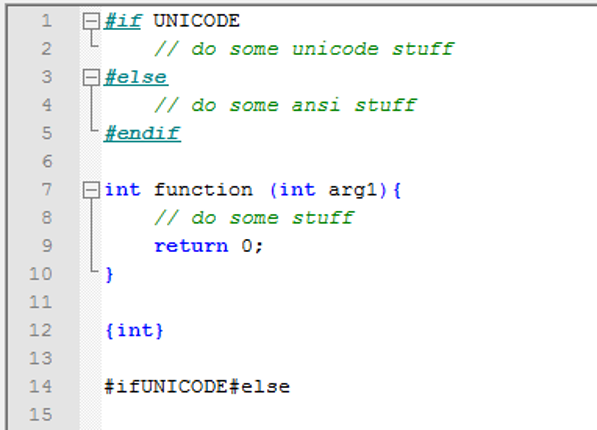
Notepad++ being used for coding
Which Tool Is Better for Quick Notes?
This is where an online notepad shines.
Suppose you suddenly remember something you need to buy. Or you're on a video call and need to jot down three action items. Or you're researching a topic and want to temporarily collect useful phrases.
You don't necessarily need syntax highlighting, plugins, or advanced search.
You need a blank space.
That's exactly where a browser-based notepad makes sense.
A simple workflow might look like this:
- Open your browser.
- Go to your online notepad.
- Write the information.
- Organize it into short lines.
- Copy or save the content when you're finished.
The fewer steps between having an idea and capturing it, the more likely you are to actually record it.
Which Is Better for Writers and Content Creators?
For writers, the answer depends on the stage of the writing process.
An online notepad works well for idea capture and rough drafting. You can quickly write headlines, outlines, opening paragraphs, interview questions, or notes without worrying about formatting.
Notepad++ can be useful when you're working with plain-text files, markup, scripts, or technical content.
For example, a blogger might use an online notepad to collect:
Article idea:

Notepad++ vs online notepad

Main points:

- Installation

- Accessibility

- Coding

- Quick notes

- Privacy

- Best use cases
Once the idea develops, they can move it into a dedicated writing or publishing environment.
This illustrates an important point: you don't need to choose one tool forever. Different tools can serve different stages of your workflow.
How to Choose the Right Tool
If you're unsure whether to pursue a notepad++ download or use an online notepad, ask yourself five questions.
1. Do I Need Advanced Editing?
If yes, Notepad++ is likely the better option.
If you only need basic text input, an online tool may be enough.
2. Do I Need to Work Offline?
If you frequently work without reliable internet access, desktop software has an advantage.
If you're usually connected, browser access may be more convenient.
3. Am I Working With Code?
For serious programming or technical text editing, Notepad++ offers more specialized functionality.
For short snippets and temporary notes, an online notepad can be perfectly adequate.
4. Do I Switch Devices Frequently?
If you work on different computers, a browser-based tool can reduce friction.
You don't have to install the same application everywhere.
5. How Much Complexity Do I Actually Need?
This question gets overlooked.
More features aren't automatically better. If your typical task is "write something down and move on," simplicity is a feature.
Best Practices for Using an Online Notepad
A few habits can make browser-based note taking more useful.
Keep One Idea Per Block
Instead of mixing grocery items, meeting notes, and article ideas into one giant wall of text, separate them clearly.
For example:
MEETING

- Confirm launch date

- Send revised proposal

ARTICLE

- Research title ideas

- Find supporting examples

PERSONAL

- Buy coffee

- Call dentist
This makes the content easier to scan.
Use Clear Labels
Short labels help you find information quickly.
Use headings such as:
TODAY
TO-DO
IDEAS
RESEARCH
DRAFT
You don't need elaborate formatting to create structure.
Review Temporary Notes
Online notes can become digital clutter.
Review what you have written daily, or even weekly. Delete information you no longer need and move useful material into the appropriate long-term system.
Don't Store Sensitive Information Casually
A browser-based notepad is not automatically a secure password manager.
Avoid putting passwords, banking details, private medical information, or confidential business information into a basic note-taking tool unless its security and privacy features are appropriate for that use.
Common Mistakes to Avoid
Choosing Features Instead of Use Cases
Don't select a tool simply because it has more features. Start with what you actually do.
Assuming Every Online Notepad Saves Automatically
Browser tools differ. Some save locally, some may offer downloads, and others may provide cloud storage. Understand how your chosen tool handles your content.
Using Notepad++ for Every Tiny Task
Notepad++ is powerful, but powerful tools can introduce unnecessary friction for simple tasks.
Using an Online Notepad for Complex Development
A basic browser editor isn't a replacement for a proper coding environment when your project requires advanced editing, extensions, debugging, version control, or project management.
Ignoring Privacy
Before entering private information, check the tool's privacy practices and understand where your content goes.
Never Organizing Your Notes
A note-taking tool only helps if you can find useful information later. Use simple labels and regular cleanup.
Frequently Asked Questions
Is Notepad++ free to download?
Yes. Notepad++ is distributed as free, open-source software. Always obtain downloads from the official Notepad++ website or another trusted source rather than unfamiliar download sites.
Is Notepad++ better than an online notepad?
Neither is universally better. Notepad++ is generally better for advanced text editing and coding, while an online notepad is often more convenient for quick notes and browser-based writing.
Can I use an online notepad for coding?
Yes, especially for short code snippets, commands, pseudocode, or temporary text. For larger development projects, a dedicated editor such as Notepad++ generally offers more useful features.
Do I need to download software to use an online notepad?
Usually not. That's one of the main advantages of browser-based tools. You can generally open the website and start typing without installing desktop software.
Can I use Notepad++ without internet?
Yes. Once installed, Notepad++ is a desktop application and can be used offline for local editing.
Is an online notepad safe for passwords?
A basic online notepad should not be treated as a password manager. Avoid storing passwords or other sensitive information unless the service specifically provides appropriate security features.
Which is better for writing: Notepad++ or an online text editor?
For quick drafts, brainstorming, and temporary writing, an online text editor can be more convenient. Notepad++ is useful for plain-text files and technical writing, particularly on Windows.
Can an online notepad replace Notepad++?
For simple notes and basic text editing, yes. For advanced programming features, plugins, syntax highlighting, and complex text manipulation, it generally won't replace Notepad++.
Why would someone use an online notepad instead of installing Notepad++?
Convenience is the main reason. If you only need a place to type a quick note, installing software can be unnecessary. A browser-based notepad gets you started with fewer steps.
Should I use both Notepad++ and an online notepad?
Absolutely. They can complement each other. Use Notepad++ for advanced local editing and an online notepad for quick notes, brainstorming, temporary text, and situations where you need immediate browser access.
Conclusion
The choice between a Notepad++ download and an online notepad isn't really about finding one universal winner. It's about matching the tool to the job.
Notepad++ makes sense when you need a powerful Windows-based editor for coding, structured text, advanced searches, and offline work. An online notepad is often the smarter choice when you need speed, simplicity, and access from a browser without installing software.
For everyday notes, quick drafts, brainstorming, checklists, and temporary text, a lightweight online text editor can save you time and unnecessary complexity. When your work becomes more technical, Notepad++ can provide the deeper editing capabilities you need.
If you want to try a simple browser-based option right now, visit Notepad Online Free and start writing without downloading anything.
Try a Simple Browser-Based Option
If you want to try a simple browser-based option right now, visit Notepad Online Free and start writing without downloading anything.